

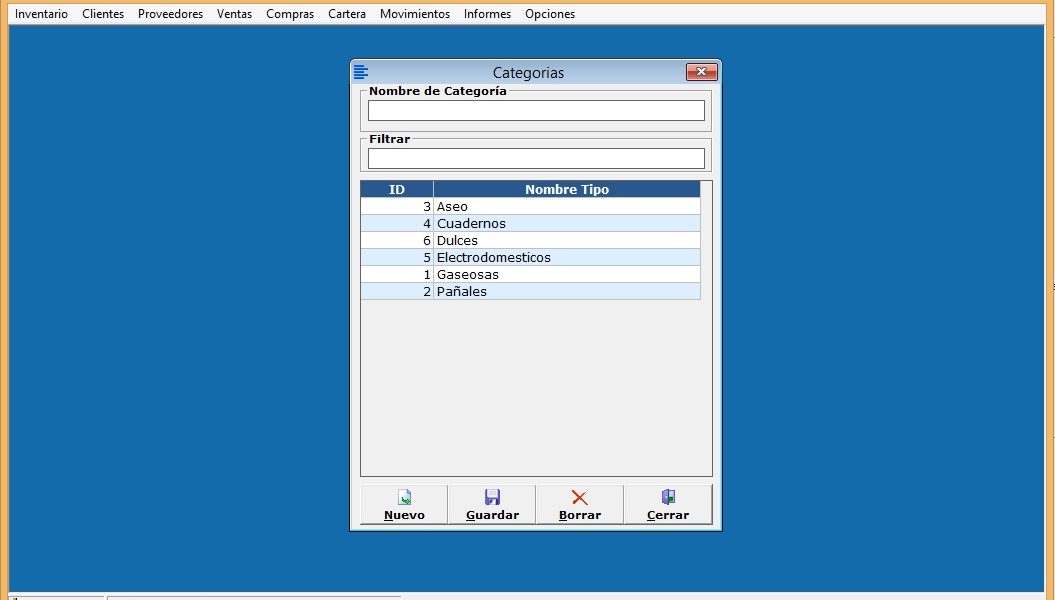
En esta lección vamos a crear el Formulario de Categorías para productos.
En este vídeo basado en el diseño de la base de datos creamos las tablas del modulo de inventario las cuales son:
- Productos
- Categorías
- Proveedores
Creamos el formulario de Categorías y lo que hacemos es usar las sub procedimientos que usamos en el formulario de Tipos de Usuario ambos formularios son muy parecidos y se uso casi todo el código.
Primer Sub procedimiento GuardarCategoria
Sub GuardarCategoria()

    If txtNombrecategoria = "" Then
       MsgBox "Debe llenar el nombre de la Categoria", vbExclamation, "Error"
       Exit Sub
    End If
    If IdTipoCategoria = 0 Then
        IdTipoCategoria = UltimoIdTabla("tblCategorias", "IdCategoria")
        Sql = "Insert Into tblCategorias (IdCategoria, NombreCategoria) Values (" & IdTipoCategoria & ",'" & txtNombrecategoria & "') "
    Else
        Sql = "Update tblCategorias SET NombreCategoria = '" & txtNombrecategoria & "' Where IdCategoria = " & IdTipoCategoria
    End If
    ConexionADO.Execute Sql

    Call LlenarGridCategorias
End Sub
Segundo Sub Procedimiento Editar
Sub EditarCategoria()
    If msGrid.Row > 0 Then
       IdTipoCategoria = msGrid.TextMatrix(msGrid.Row, 1)
       txtNombrecategoria = msGrid.TextMatrix(msGrid.Row, 2)
    End If
End Sub
Tercer Sub Procedimiento LlenarGridCategorias
Sub LlenarGridCategorias()
    Dim Sql As String
    Dim Columnas As Integer
    Columnas = 2
    Sql = "Select IdCategoria, NombreCategoria From tblCategorias Where NombreCategoria Like '" & txtFiltrar & "%' Order By NombreCategoria ASC "
    Call LlenarGrid(msGrid, Sql, Columnas)


    msGrid.ColWidth(0) = 0
    msGrid.ColWidth(1) = 1100
    msGrid.ColWidth(2) = 4000
   ' msGrid.ColWidth(3) = 1200

    msGrid.TextMatrix(0, 1) = "ID"
    msGrid.TextMatrix(0, 2) = "Nombre Tipo"
   ' msGrid.TextMatrix(0, 3) = "No. Productos"

End Sub
Cuarto Sub procedimiento Borrar Categoria
Sub BorrarCategoria()
    Dim TempRecorset As New ADODB.Recordset
    Dim IdCategoria
    Dim NombreCate

    If msGrid.Row > 0 Then
       IdCategoria = msGrid.TextMatrix(msGrid.Row, 1)
       NombreCate = msGrid.TextMatrix(msGrid.Row, 2)

       'Se consulta si tiene articulos vinculados
      ' Sql = "Select IdCategoria From tblCategorias Where IdCategoria = " & IdCategoria
      ' Set TempRecorset = ConexionADO.Execute(Sql)

      ' If TempRecorset.RecordCount > 0 Then
      '    MsgBox "El Tipo de usuario ya esta en uso por algun usuario no se puede eliminar", vbExclamation, "Error"
      '    Exit Sub
      ' End If

       Res = MsgBox("¿Esta seguro de borrar la Categoría: " & NombreCate & "?", vbYesNo, "Borrar")
       If Res = vbYes Then
          Sql = "Delete from tblCategorias Where IdCategoria = " & IdCategoria
          ConexionADO.Execute Sql
          Call LlenarGridCategorias
       End If
    End If
End Sub
Por ultimo al escribir en el textbox de filtrar al dar Enter debe arrojar el resultado:
Private Sub txtFiltrar_KeyUp(KeyCode As Integer, Shift As Integer)
    If KeyCode = 13 Then
       Call LlenarGridCategorias
    End If
End Sub